
S.A.F.E. SOLUTIONS
Module PASA
The module PASA allows to generate the Preliminary Aircraft Safety Assesment.
Process:
This module is organized in a Top-Down way.
Starting from the list of Aircraft Failure Conditions, one or several System Scenarios can be defined, making a direct link to a contributor, or an AND Gate between 2 or 3 contributors. Each contributor to a System Scenario can be a System Failure Mode, or a Gate (OR, AND or Voting). The gates can host between 2 and 18 System Failure Modes.
Quantitative and qualitative allocations can be done at each step.

| Class of Data | Definition |
| Aircraft Architecture Scenario | Direct relationship from a Failure Condition to : – a contributor, or – an AND Gate between 2 or 3 contributors. A contributor can be a Gate, or a System Failure Mode. |
| System Failure Mode | A specific way in which a System fail (Total loss, Malfunction, …). The System Failure Mode will be traced and developed further at System level. |
| Aircraft Gate | Boolean logic gate to show the relationship between a parent (Failure Condition, Scenario or Gate) and children(s) (Scenario, Gate, System Failure Mode). |
Main Features:
- List, View, Edit, Duplicate, Delete the System Scenarios, the Aircraft Gates and the System Failure Modes.
- Generate the appendix for the PASA Certification report : PASA worksheet, list of System Failure Modes, …
- Manage the assumptions used for the definition of the System Scenarios and the System Failure Modes.
- Provide a list of System Failure Modes, sorted by system, Failure Condition, generic Failure Mode, range of probability, severity, F/IDAL.
- Define the Safety requirements for the System Failure Modes, and the Independence Requirements between two System Failure Modes.
- Link, unlink quickly the System Failure Modes to the Gates.
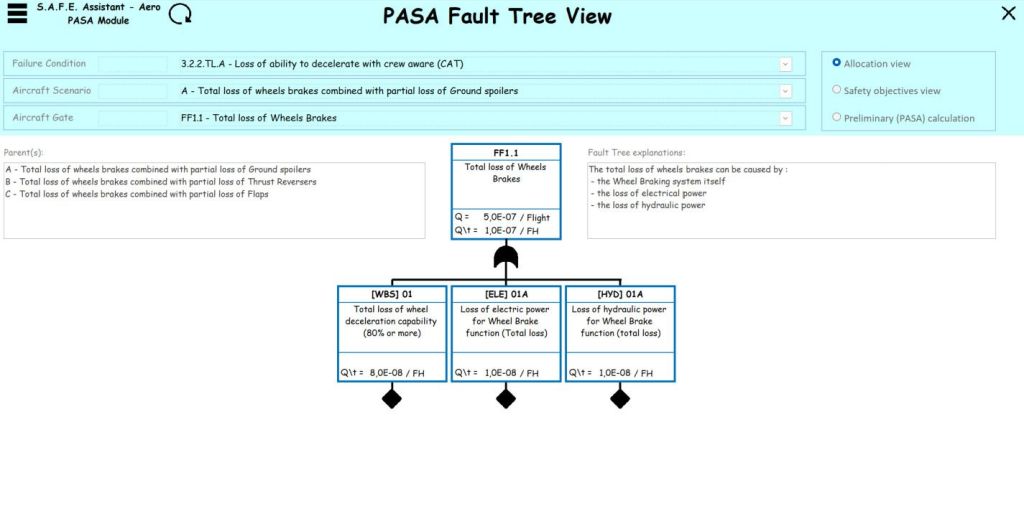
- Provide a Fault Tree view with different views: allocation, Safety objectives and PASA calculation. (see picture above).
- Note: The PASA calculation is performed without minimal cutsets calculation (planned for 2025.R4)
- Provide a Top-Down view to show the arborescence from the Failure Condition to the System Failure Modes
- Provide a Bottom-Up view to navigate quickly from the Systems the Failure Conditions
- Provide a Summary View of the module, with filters on Failure Condition, Severity, System, System Failure Mode, System Scenario, Phases and Intensifying Factors.
 S.A.F.E. SOLUTIONS